

Two new capabilities on the Rhino Federated Computing Platform (Rhino FCP) connect federated projects to the data platforms and models you already run, then turn that work into pipelines you can run again at every site.
Summary
- Trusted Integrations connects each Rhino Client to systems inside your secure perimeter, such as Snowflake accounts, FHIR servers, and foundation models on Amazon Bedrock.
- Workflows packages multi-step federated work into a versioned pipeline that runs the same way at every site, on each site's own data.
- Together, they let one federated pipeline read from the platforms you already use, call the models you already run, and write results back, with a record of every run.
Today, we're launching Trusted Integrations and Workflows on the Rhino FCP.
Federated AI has a scaling problem, and it rarely shows up in the pilot. The first project works, involving one team, one dataset, and a model trained where the data lives. Then, for example, the organization wants ten more projects across twenty sites, each one pulling from Snowflake, calling a model on Amazon Bedrock, and refreshing every quarter. Suddenly, every connection needs a custom integration, and every rerun starts from scratch.
Trusted Integrations and Workflows close that gap. Trusted Integrations connects each Rhino Client to the data platforms and models your teams already use, and Workflows packages multi-step federated work into pipelines you can rerun at any site. Below, we walk through how each one works and what they look like together in practice.
Moving Federated AI Beyond the Pilot
The pilot-to-program gap reaches well beyond federated AI. Across enterprise AI, only four of every 33 proofs of concept reach production, according to IDC research conducted with Lenovo.
Federated programs face a sharper version of that gap, because the data lives in places no single team controls. A program needs three things a pilot can skip: data from the platforms each site already runs, models the security team already trusts, and answers for stakeholders who ask what ran, what left each site, and what resulted. Agentic AI raises the stakes again, because no enterprise will let an agent act on its data until those actions are scoped and reviewable.
Trusted Integrations covers the first two needs. Workflows covers the third, along with providing the secure boundary agents need.
Trusted Integrations Connects Federation to Your Enterprise Stack
Trusted Integrations lets a Rhino Client open a scoped connection to the systems inside your secure perimeter. Instead of exporting data into a new environment or writing a one-off connector, a federated project reads from and writes to the tools your teams already use.
At launch, Trusted Integrations supports Snowflake, FHIR servers, Databricks, MongoDB, and Amazon Bedrock. Trusted Integrations is built to reach much more of the stack, from object stores like Amazon S3 and secrets managers to managed health data services like AWS HealthLake, AWS HealthImaging, and AWS HealthOmics. Customers can also request a custom integration for any other system their teams rely on.
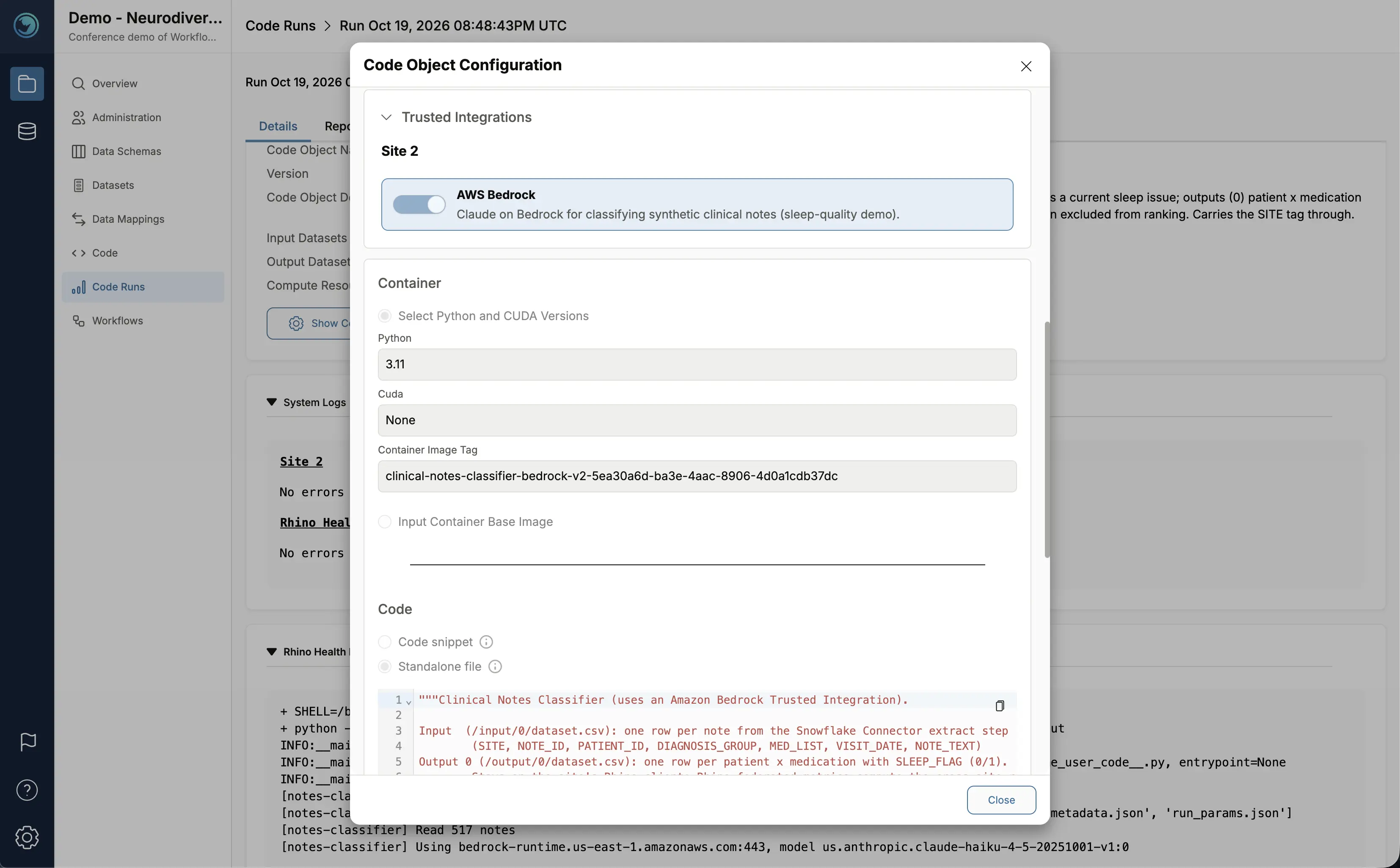
Your source data and networking stay under your control. Data can move in either direction: into the Rhino Client for analysis, or out to a model endpoint as context for an AI agent. Only what the integration allows crosses the connection, and the connection stays open only while the code that needs it runs. For example, Rhino customers can call foundation models on Amazon Bedrock through a Trusted Integration, so an agent works with sensitive data inside the customer’s own AWS environment, and the user sees only the output aggregate results, never the sensitive data itself.
Workflows Turns Federated Work into Software You Can Run Again
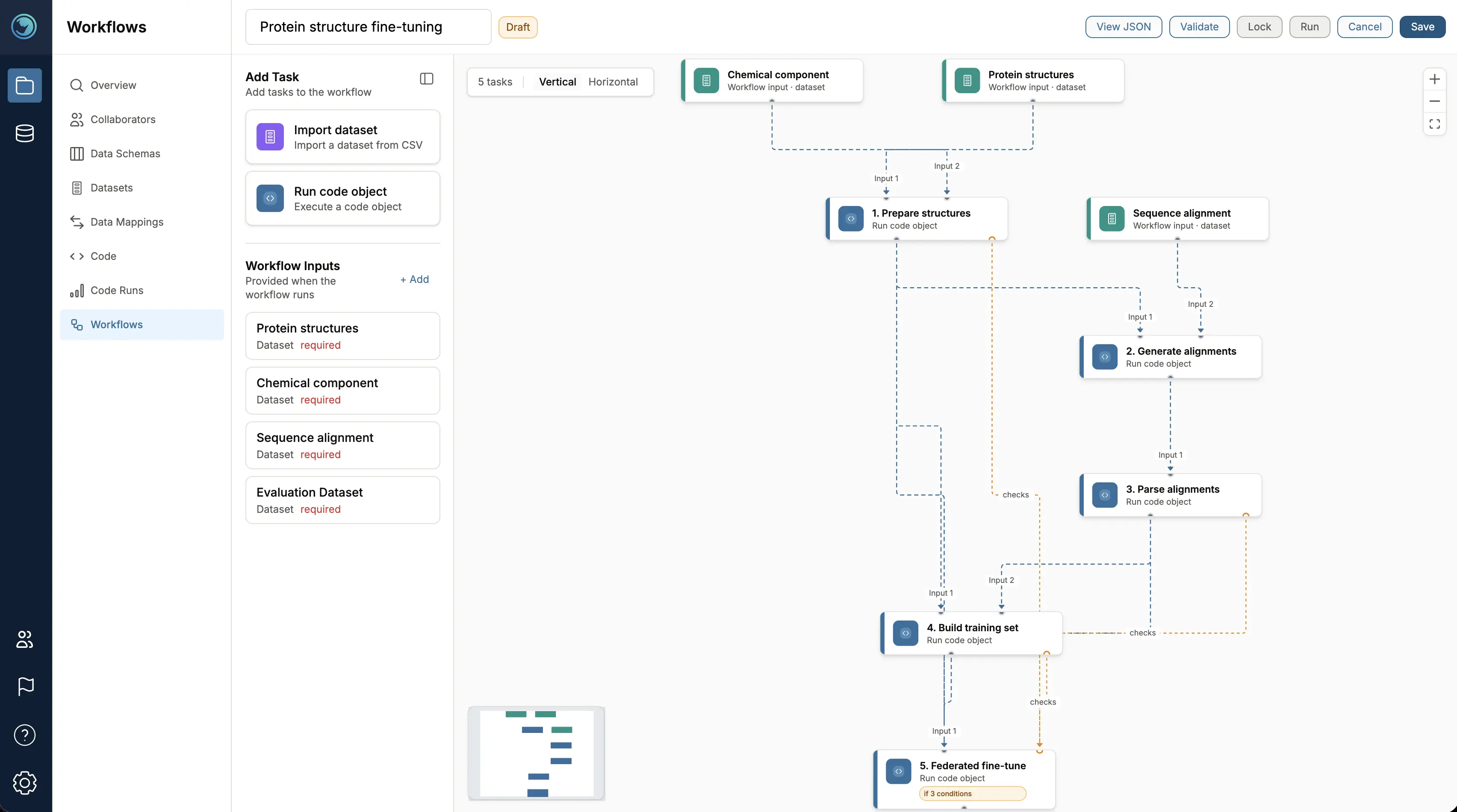
Workflows turns multi-step federated work into software that teams build once and reuse. A team chains Code Objects and Datasets into a single versioned pipeline on the Rhino FCP, then runs it the same way at every site, on each site's own data, without glue scripts or manual hand-offs. Independent steps run in parallel, and conditions decide what runs next based on earlier results.
Because every site runs identical steps, any difference in results comes from the local data. Every run records the exact pipeline it executed, along with each task's status, logs, and outputs. When new data arrives or a twentieth site joins, the team reruns the Workflow and keeps going. Workflows also gives AI agents a clear boundary: an agent acts only through steps a team has defined and can review.
Use Case: Linking Medications to Sleep Issues Across Pediatric Clinics
Consider a research question that spans several pediatric clinics, illustrated here with fully synthetic data from fictional sites: for children diagnosed with ADHD, autism, or both, which medications are linked to the fewest and the most documented sleep issues?
One Workflow answers it in three steps:
- Pull the data. Through one Trusted Integration, the Workflow pulls patient, medication, and clinical note data from each participating clinic's Snowflake account, on demand.
- Read the notes. When that step completes, a Code Run at each clinic calls that clinic’s own LLM endpoint on Amazon Bedrock through a second Trusted Integration to identify which patients have documented sleep issues. The notes go only to the clinic’s own endpoint, and the researcher receives only the results.
- Combine the results. A federated analysis combines each clinic’s results, showing for each diagnosis group which medications are linked to the fewest and the most sleep issues. The Workflow then writes these combined results back to Snowflake through a Trusted Integration, so the researcher sees only these combined results.
In this example, Trusted Integrations connects the Rhino FCP to systems the clinics already use and pulls data only when the Workflow needs it. Workflows packages steps across Snowflake, Amazon Bedrock, and the Rhino FCP into one repeatable, versioned process. Adding another clinic means one more run of the same Workflow.
Three More Ways to Put Both Capabilities to Work
The same pattern fits any program where data sits in more than one place. Both capabilities extend Rhino Data Activation and Rhino Federated Intelligence, the single-party and multi-party solutions built on the Rhino FCP.
1. Refresh Research Data Without Rebuilding the Pipeline
Let’s say you run data operations for a hospital network whose clinical data warehouse updates on a regular schedule. Researchers need those records in one consistent format, but local codes, units, missing fields, and mapping exceptions turn every refresh into another round of preparation. With Rhino Data Activation, the team builds one Workflow and reruns it with each refresh:
- Read the new records. A Trusted Integration retrieves them from the hospital’s Snowflake account or a FHIR store such as AWS HealthLake.
- Apply the agreed mappings. Rhino’s Data Harmonization Engine converts fields, terminology, and units into the format the research project requires.
- Check the results. Validation steps catch missing fields, invalid values, duplicates, and unresolved mappings, then write exceptions to a local review table.
- Publish validated data. Records that pass are written back to Snowflake or the FHIR store, along with a report of what was processed, published, and held for review.
At the next refresh, the team reruns the same Workflow instead of rebuilding the preparation. Researchers get current, consistently prepared data, and data engineers reuse the mappings and quality checks they already built. The same Workflow can serve one hospital or an entire research network.
2. Validate a Vendor’s AI Model as It Evolves
Let’s say your health system wants to evaluate a vendor’s CT model across its hospitals and keep evaluating it as the vendor ships updates. The goal is to learn how performance shifts across scanners, acquisition protocols, and patient populations. The images can’t easily leave each hospital, so the evaluation goes to them:
- Retrieve the images. A Trusted Integration pulls study metadata and image frames from each hospital’s AWS HealthImaging datastore.
- Run the model locally. The Workflow preprocesses the images, runs the vendor’s model, and compares its predictions with the hospital’s reference labels.
- Measure performance. The Workflow calculates results by scanner, protocol, or patient group.
Each hospital keeps its images, labels, and individual predictions. The vendor receives aggregate performance summaries that show where the model needs more investigation or adaptation, and those results can support a regulatory evidence package.
The same Workflow keeps the evaluation current. Vendors often update their models more frequently than new hospitals join, so the team reruns the Workflow across all existing sites with each release to confirm performance is maintained or improved. When a new hospital joins, one more run validates the model at that site.
3. Run a Shared Genomics Pipeline Across Partners
Let’s say you coordinate a research consortium where each partner processes sequencing data with the same RNA-seq or variant-calling pipeline, then feeds the results into a federated analysis. Every partner already runs its own cloud compute. Built on Rhino Federated Intelligence, the consortium’s Workflow coordinates the work at each site:
- Validate the inputs. A container checks the sample manifest, required metadata, and input locations.
- Start the cloud run. A Trusted Integration launches the agreed pipeline version on AWS HealthOmics and writes outputs to the partner’s Amazon S3 location.
- Track completion. The Workflow moves on only after the run succeeds and its outputs pass validation.
- Prepare the results. Rhino containers turn the outputs into features for the next local analysis or federated learning step.
Each partner keeps its raw sequencing data and individual-level outputs in its own environment, and the consortium decides which results to share. Partners contribute to a common pipeline while using the cloud compute and storage they already run. The Rhino FCP handles coordination, validation, and audit logging across the consortium.
Run Federated AI on Your Own Stack
Trusted Integrations and Workflows are available now to Rhino FCP customers. Every enterprise stack looks different, so the best place to start is a conversation about yours.
Talk to our team to see a demo and explore how Trusted Integrations and Workflows could connect to the systems you already run.


